
IMFPlayer: Difference between revisions
From Wolfenstein 3D Wiki
More actions
imported>ThomasWeiling Created page with "{{Mod|title1=IMF Player|author(s)=K1n9_Duk3|release_date=February 14, 2013 (v1.0) May 10, 2020 (v1.3)|sourceport=DOS}} It is what the name implies: an IMF player for DOS. You can change the playback rate while the song is playing (in case you forgot to pass the correct rate to the program at startup) and you can also toggle looping on/off. The player will also analyze the IMF commands and display which channels are currently playing notes and which channel..." |
imported>ThomasWeiling Adding categories |
||
| Line 17: | Line 17: | ||
* [http://k1n9duk3.shikadi.net/imftools.html IMF Tools] at [http://k1n9duk3.shikadi.net/ K1n9_Duk3 Reloaded] | * [http://k1n9duk3.shikadi.net/imftools.html IMF Tools] at [http://k1n9duk3.shikadi.net/ K1n9_Duk3 Reloaded] | ||
[[Category:Utilities]] | |||
Revision as of 19:28, 24 October 2025
| Author(s) | K1n9_Duk3 |
| Release date | February 14, 2013 (v1.0) May 10, 2020 (v1.3) |
| Source port | DOS |
It is what the name implies: an IMF player for DOS.
You can change the playback rate while the song is playing (in case you forgot to pass the correct rate to the program at startup) and you can also toggle looping on/off.
The player will also analyze the IMF commands and display which channels are currently playing notes and which channels are disabled.
Gallery
-
 Simply type "IMFPLAY" and then the filename (short filename preferred!) and then the playback rate. 700 is the standard, though this can also be toggled inside the player.
-
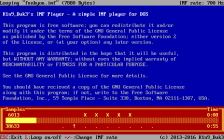 Once the file has been selected and plays, the loop function can also be toggled along with the playback rate.

